

Backup and recovery
One server. Proven recovery.
host42 was designed backup-first. Every VM is encrypted with its own key, every backup is verified before it counts, and a guided wizard brings a VM back when you need it.
What you get
Backups you can trust with your business
Encrypted at rest
Every new VM's disk is encrypted with its own AES-256 key, held under an org key sealed on the host, with TPM 2.0 where the server has it. Orgs may bring their own key.
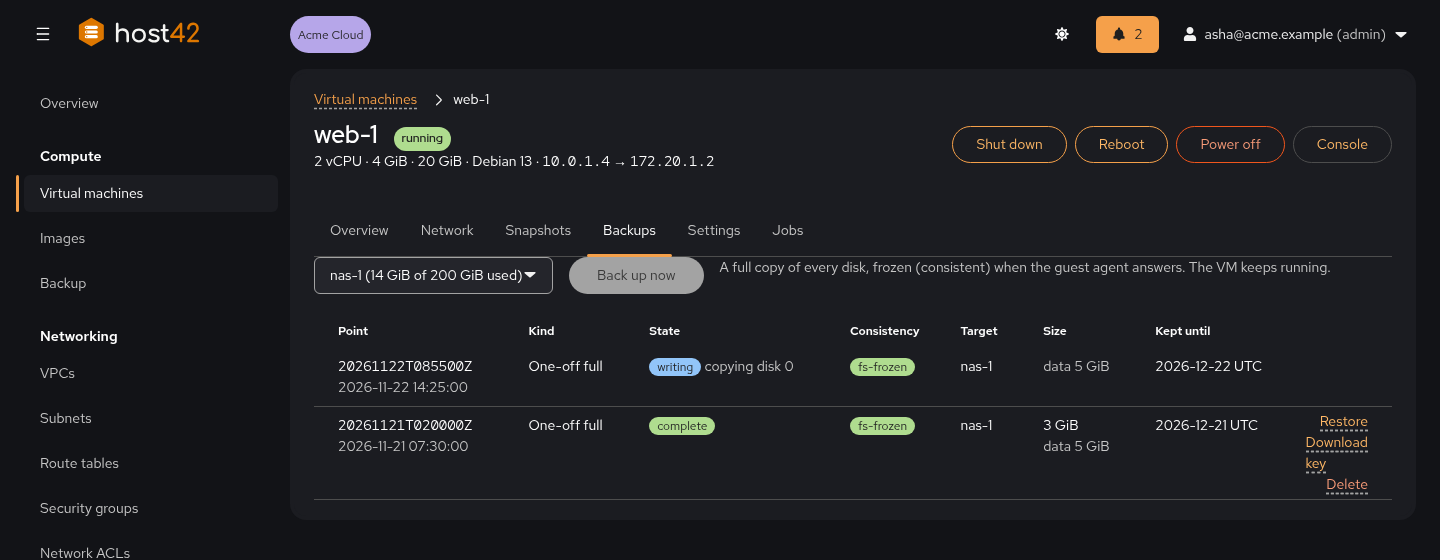
Back up now
A full copy of every disk of a running or stopped VM, with the guest's file systems frozen for consistency. The VM keeps running.
Verified as written
Each backup is compressed, encrypted with the VM's key, signed, and read back and compared before it is marked complete.
Your own NAS
Up to five network storage targets, tested when added and every day for speed, free space and snapshots. The provider decides which orgs may use each and how much.
Restore in place or as new
Write a recovery point back over the VM, with an automatic rollback if anything fails, or restore it as a new VM next to the original.
Never a silent failure
A failed backup leaves nothing half-written and emails the org's admins. A failing target sends a daily notice.
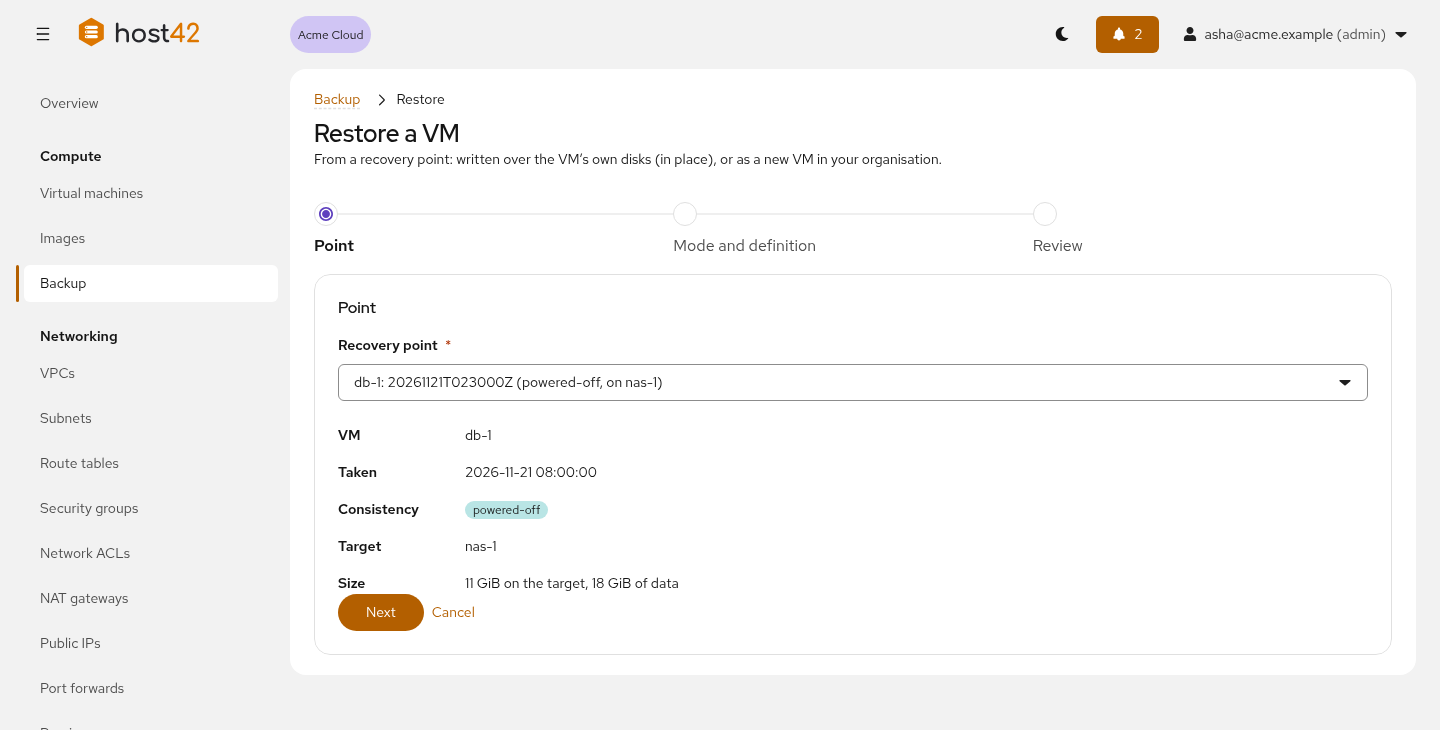
The restore wizard
Three steps back to running
Choose a recovery point, choose in place or a new VM with its network, review, and restore. Before any data is used, each layer is checked and read in a sandbox that opens only the destination disk.
- In place keeps a safety snapshot of the VM for seven days
- As a new VM gets a new name, new addresses and its original firmware settings
- Progress shown step by step in the console and in the org's jobs
How a backup works
Consistent, encrypted, verified
Freeze
The guest's file systems are frozen for a consistent point, then released; the VM keeps running.
Copy and encrypt
Each disk is compressed and encrypted with the VM's own key on the server, so the NAS only ever stores encrypted disk data.
Verify and record
Every range is read back and compared, the manifest is signed, and the point appears in the org's console.
Who does what
Recovery belongs to the org, guarded by the provider
- Org admins and operatorsBack up any VM and restore it, in place or as a new VM.
- Org adminsDownload a VM's key with a fresh two-step code, and rotate it.
- The providerAdds NAS targets, grants them to orgs and sets each org's backup quota; never sees inside a VM.
- Key escrowEach target also holds a copy of the org key, sealed to an offline recovery key that Padmini keeps, so backups stay readable even if the server's own keys are lost.
- Encrypt older VMsVMs created before encryption are encrypted in one step while stopped.
- What you needA NAS with flash storage, NFS 4.1 or later on a dedicated storage network, and read-only NAS snapshots kept at least 14 days.
Coming soon
Scheduled backups
Set it once, per VM or for all of an org's VMs.
Schedules Coming soon
Hourly at a set minute, every 6 or 12 hours, daily, weekly or monthly, in your time zone, with a preview of the next runs.
Only what changed Coming soon
After the first full copy, scheduled backups send only the changed blocks.
Keep and hold Coming soon
The newest three points per VM are kept, plus legal holds for points that must stay. Three months of run history with logs.
Talk to us
See host42 on your own hardware
Tell us about your server and your customers. We show you host42 working and tell you what it costs.
- Sales and partnersinfo@padminisys.com
- Supportsupport@padminisys.com
- Phone+91 98675 11843
- OfficePadmini Systems Private Limited, Mumbai, Maharashtra, India