

Security
Security built in, not bolted on.
Every user signs in with two steps, every change is recorded, every VM is encrypted with its own key, and every build proves that one org cannot reach another.
People and access
Strong sign-in for everyone, not just admins
The same rules for the provider's staff and for every org member.
Two-step for every user
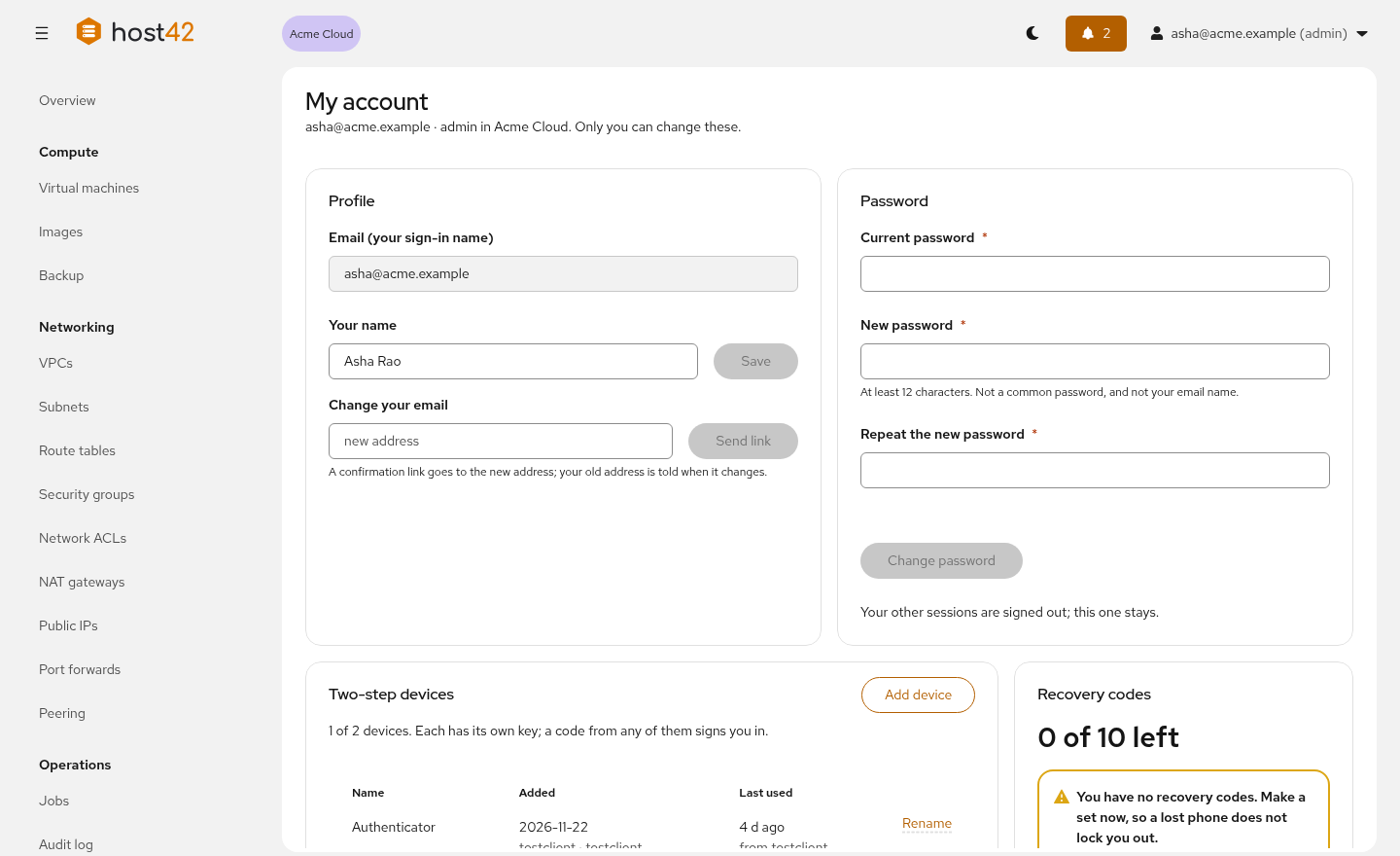
Every account uses an authenticator app as a second step: up to two devices, each code accepted once, and ten recovery codes.
Strong passwords
At least 12 characters, with tens of thousands of common passwords refused. Resets only by an emailed link; no password is ever shown.
Step-up for sensitive changes
Sensitive steps, such as changing a password, making an API token or downloading a VM's key, ask for a fresh two-step code.
Sessions that end
Sessions last at most 12 hours and end after 30 idle minutes. Users see their sessions and can end any of them.
Tokens with limits
API tokens live 1 to 365 days, are shown once and stored hashed. Owners are told before they expire.
Service accounts
Automation gets its own accounts with API tokens only and no console sign-in, so scripts never borrow a person's login.
Slowed down, never locked out
Repeated sign-in attempts are slowed, not locked, so attackers gain nothing and users are not shut out.
Changes you hear about
A new email address is confirmed by a link, and the old address is told. Recovery codes running out shows a warning.
Your browser keeps working
When someone hammers an account, unknown browsers are slowed down while a browser that signed in before carries on as normal.
Data
Encrypted, recorded, accountable
A key per VM
Every new VM's disk is encrypted at rest with its own AES-256 key, held under an org key sealed on the host, with TPM 2.0 where the server has one.
Your key, if you want
Orgs may bring their own key. Admins download a VM's key with a fresh two-step code and rotate it.
Append-only audit trail
Every change is logged with who made it. Not even the database owner can edit or delete entries, and orgs see provider actions on their org too.
Encrypted backups
Backups are encrypted with the VM's key before they leave the server, then verified as they are written.
Keys erased on purge
When a VM or an org is purged, its keys are erased with it.
Notices when it matters
Org admins hear about crashed VMs, failed backups and provider actions such as a quarantine, in the console, and urgent ones by email.
The host
Least privilege, from the console to the hardware
The parts people use never hold the keys to the host.
- A fixed list of host operationsThe one privileged part of host42 runs only a fixed, typed list of operations. Callers send identifiers, never file paths or commands.
- Unprivileged servicesThe API, the job worker and the console proxy run as ordinary users; the web console never touches the database.
- Management is never publicThe provider console, the provider API and SSH answer only on the private management network. The host's own check fails if they answer on a public address.
- Isolation tested in every buildEvery org route is tried against a foreign org, and every route against every role: over 2,000 isolation checks. Another org's objects simply do not exist for you.
- A hardened web consoleStrict security headers, no inline scripts, cookies that scripts cannot read and other sites cannot send, and protection against cross-site requests.
- Hardened VMsNo nested virtualization, no memory page sharing between VMs, and a security profile that fails closed.
- Every change checked inSecret scanning of the whole code history, a static security scan and a dependency audit on every change to the code.
- One server, one deploymentNo cluster to secure and no traffic between hosts. Each server is its own small cloud.
The network
Safe for you and your neighbours
- Anti-spoofingVMs can only send from addresses they own, and private ranges never reach the internet.
- Port 25 closed by defaultOutbound mail on port 25 is blocked to protect your addresses' reputation, with an exception per address when a customer needs it.
- Quarantine in one stepThe provider isolates an abusive address or network card with a reason, and the org is told.
- Default denyA new security group lets nothing in, not even from the same group.
Coming soon
Next for security
Private-only org console Coming soon
One switch closes the org console's public address for the whole server; users reach it privately through a VPN such as gate42's.
Trusted certificates for the org console Coming soon
Public TLS certificates for the org console, issued and renewed automatically, with warnings before they expire.
Retention rules Coming soon
The audit trail kept at least 400 days, jobs 180 days, traffic 90 days and usage 400 days, longer if the provider wants.
Better together
host42 hosts. gate42 guards.
Put gate42 in front of an org's networks for a full firewall with intrusion prevention, web filtering and VPN, running as a VM inside host42.
Found a security problem in host42 or on this website? Please tell us first: see security reports, or our security.txt.
Talk to us
See host42 on your own hardware
Tell us about your server and your customers. We show you host42 working and tell you what it costs.
- Sales and partnersinfo@padminisys.com
- Supportsupport@padminisys.com
- Phone+91 98675 11843
- OfficePadmini Systems Private Limited, Mumbai, Maharashtra, India